Sign-up sheet

Be the first to know.

New releases, iOS news and family features — straight to your inbox. No spam, ever.

By signing up you agree to our privacy policy.

New · Available for AndroidiOS coming soon

A simple phone for seniors, without buying a new phone.

AuraDial is an easy-to-use Android app for seniors and older adults, with big buttons, a giant clock, one-tap calling, and daily family check-ins.

Free forever plan · Package com.auradial.launcher · versionCode 3 · Requires Android 8+

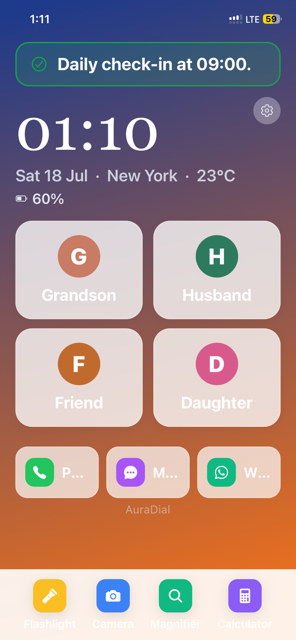
AuraDial home screen with giant clock, four favorite contacts and quick tools
A senior-friendly phone made simple

Turn the Android phone you already own into an easier phone for seniors.

Many families search for the best phones for seniors or cell phones with big buttons, but a new device is not always necessary. AuraDial replaces a busy Android home screen with a calm, clear layout that is easier to see and use.

Unlike general apps for seniors, AuraDial organizes everyday phone tasks in one place: four favorite contacts, a giant clock, useful tools, voice readout, and a simple daily check-in for family peace of mind.

Why we built this

“Dad stopped answering his phone every morning.”

For weeks, the whole family took turns calling him at 9am — just to hear his voice and know he was okay. When he didn't pick up, the panic started.

Modern smartphones weren't built for him. Tiny icons, endless notifications, apps he'd never asked for. He didn't need a supercomputer. He needed a phone he trusted.

Now every morning he taps a single button — “I'm alright” — and everyone in the family instantly knows he's safe.

💙

Simplicity for seniors.
Confidence for families.

AuraDial isn't just another launcher. It's a calmer phone for the person you love — and a quiet, respectful signal to you that everything is okay today.
Features

Designed to be effortless.

Every screen, every tap, every letter is sized for comfort and clarity.

🕰️

Giant clock

Elegant, high-contrast time and date — readable at a glance.

📞

One-tap favorites

Four favorite contacts front-and-center. No digging through menus.

✅

Daily check-in

A single tap on “I'm alright” tells family everything is okay.

👨‍👩‍👧

Family Sync

Share status with loved ones using a simple pairing code.

🔦

Built-in tools

Flashlight, Camera, Magnifier and Calculator — always one tap away.

🎨

5 beautiful themes

Twilight, Calm Sky, High Contrast, Warm Sunset and more.

🔊

Voice readout

Speaks the time and announces incoming callers out loud.

🏠

Replaces home screen

Set as the default launcher — no more confusing Android UI.

Inside the app

Real screens, real simple.

A quick tour of what your loved one sees every day.

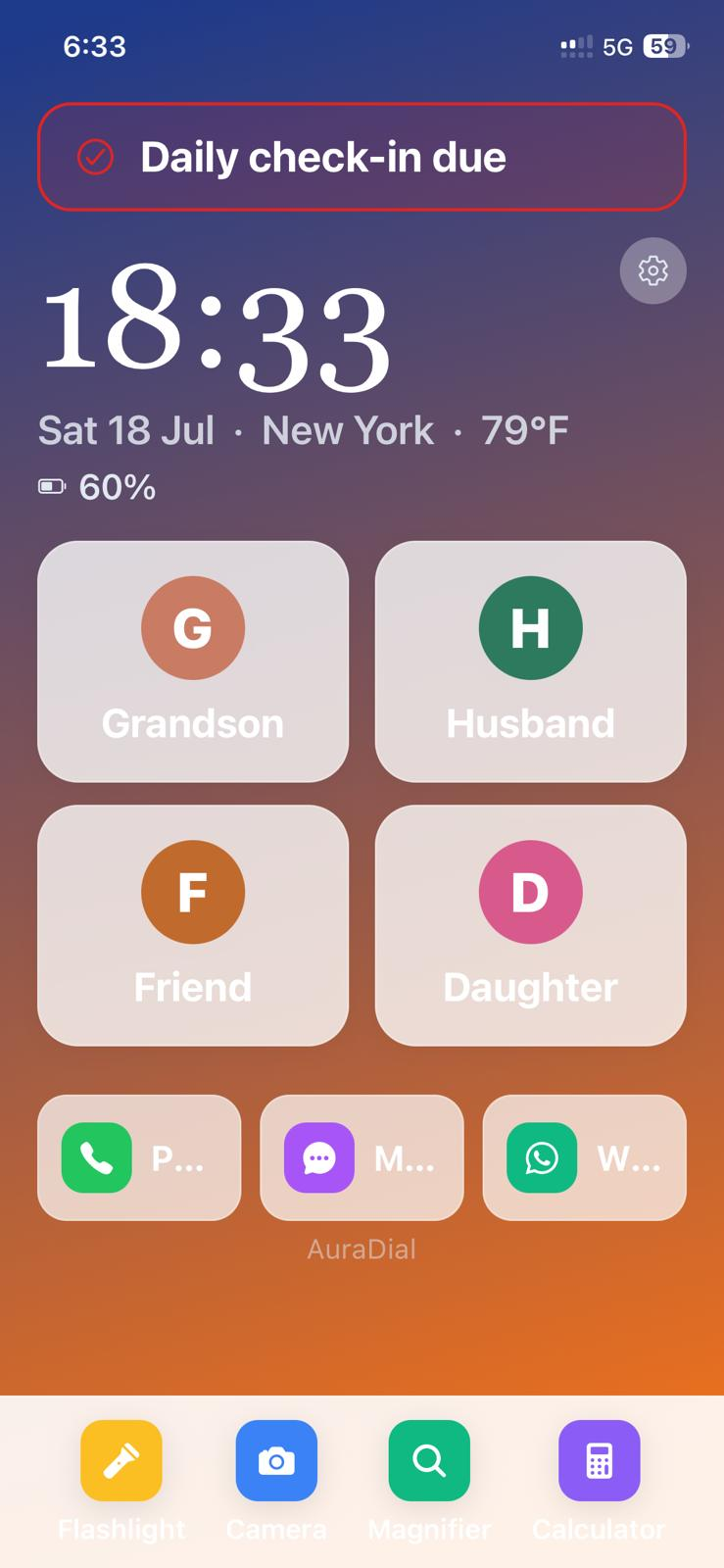
Before check-in — gentle reminder

Before check-in — gentle reminder

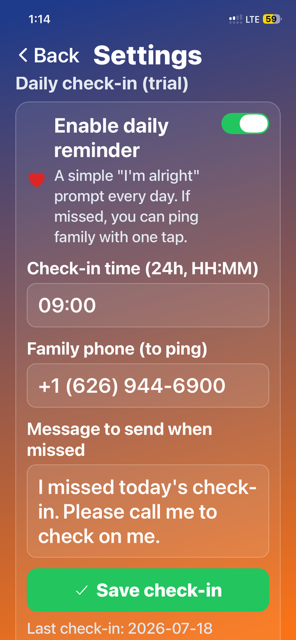
At 09:00 a soft red banner appears at the top of the home screen: “Daily check-in due.” No pop-ups, no alarms — just there when they're ready.

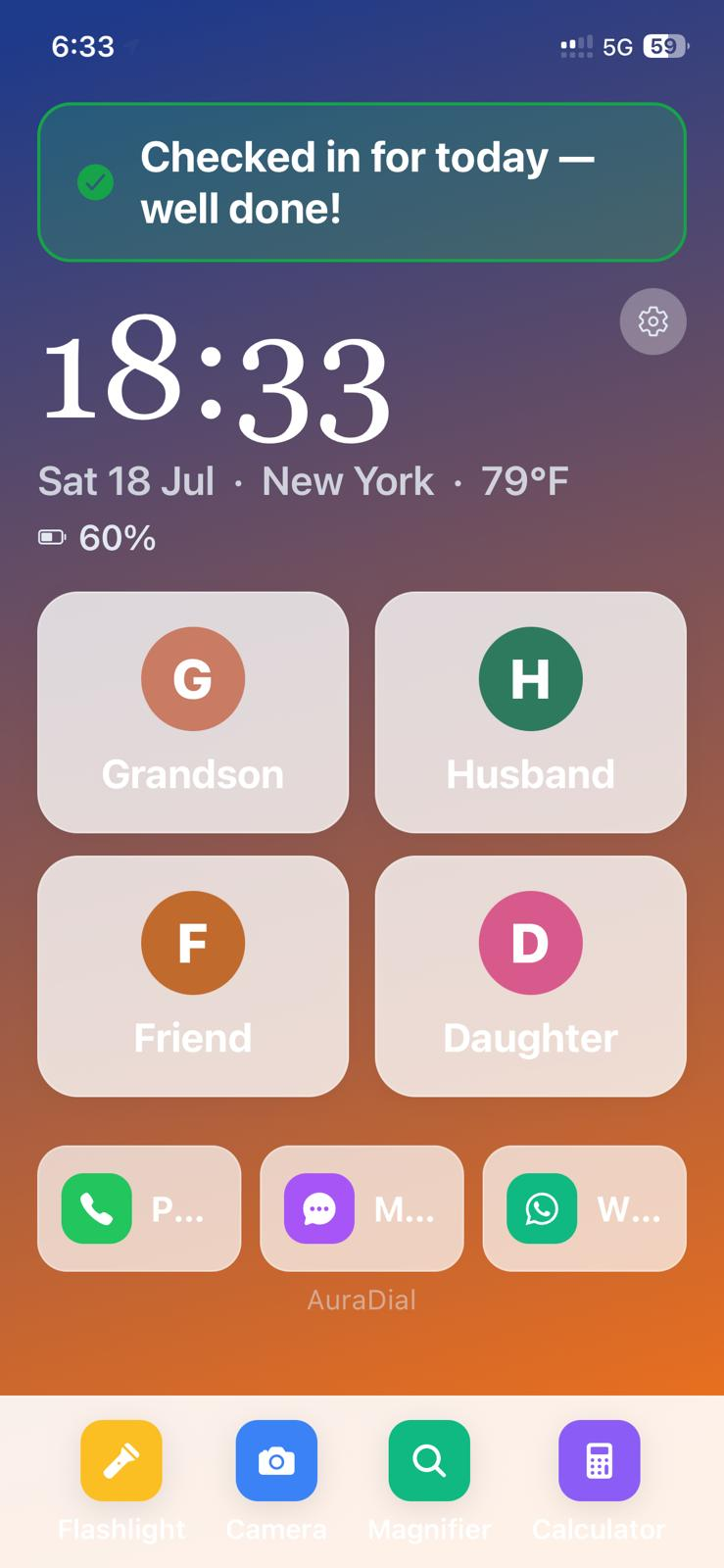
After check-in — peace of mind

After check-in — peace of mind

The banner turns green: “Checked in for today — well done!” Family gets the update instantly, and the reminder disappears until tomorrow.

One tap to check in

One tap to check in

Tapping the banner opens the check-in screen. A single “I'm alright” button — that's the whole interaction.

Share location with family

Share location with family

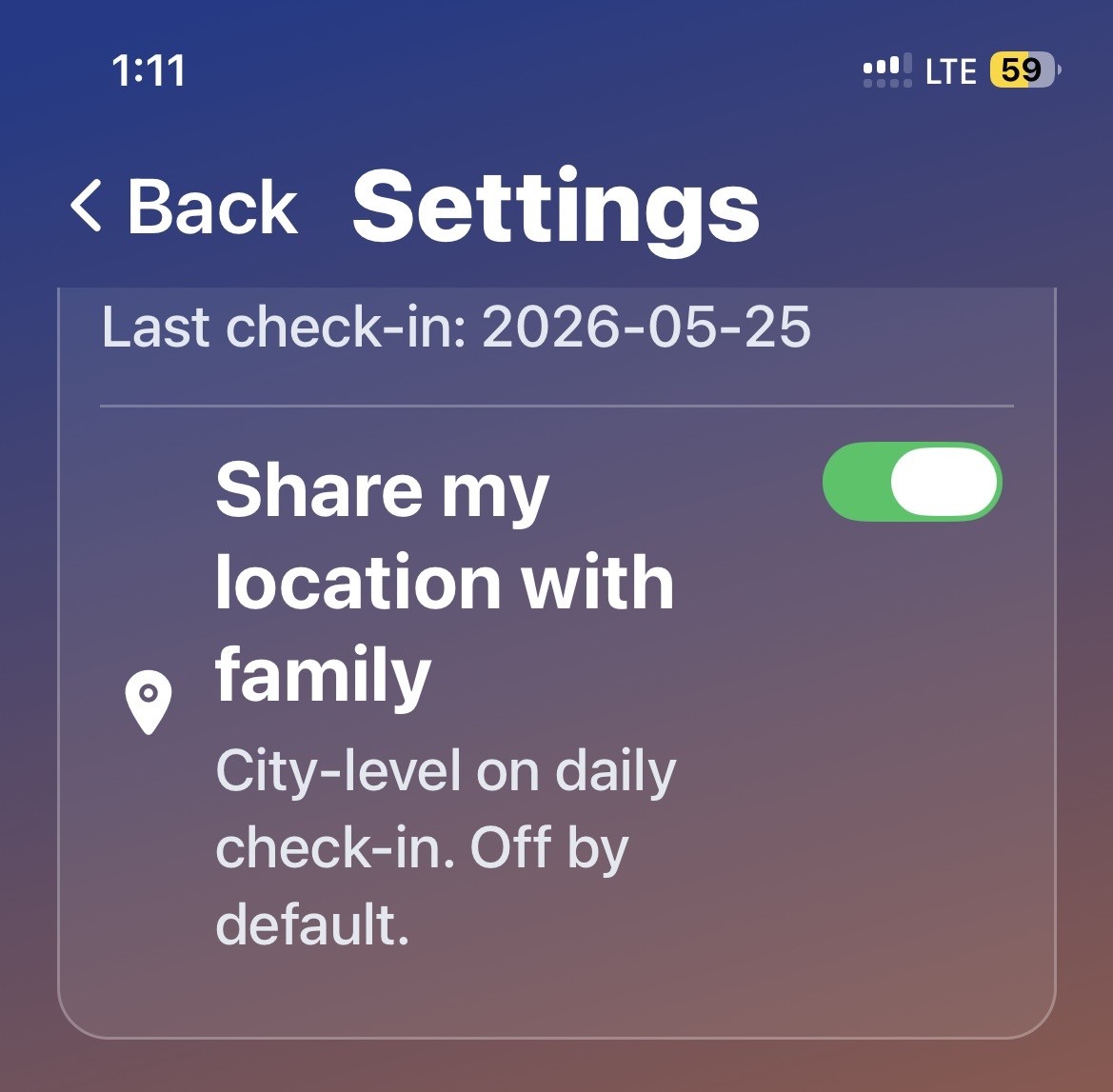
Optional city-level location shared on daily check-in. Off by default — always in your control.

Family Sync

Family Sync

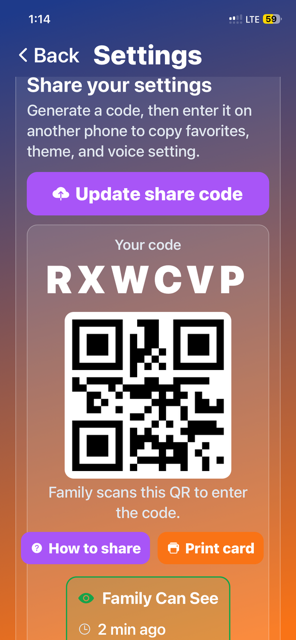
Generate a code or QR — family scans it to instantly copy favorites, theme and voice settings.

5 languages built in

5 languages built in

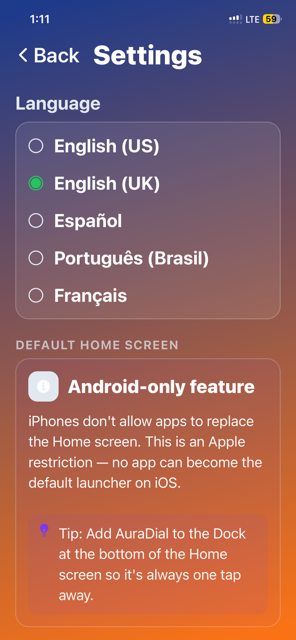
English (US/UK), Español, Português (Brasil) and Français — pick what feels like home.

For the family

A simple way to say, “I’m alright.”

The older person chooses to tap “I’m alright.” AuraDial then shares that check-in with linked family members. Communication travels from the older person to family only.

D
Dad
Chicago, IL
All good today
Last check-in
09:04 today
Shared by
Dad
Direction
To family
Location shared
City-level
Recent activity
  • ✓ Tapped “I'm alright” at 09:04
  • ✓ Check-in shared with linked family

Preview of the Family view — being rolled out.

🌅

Morning check-in

At 9:00 (or whenever you choose), AuraDial gently asks: “Are you alright today?” One tap answers.

➡️

One-way check-in

The older person actively sends their check-in to linked family members. AuraDial does not detect or alert family about a missed check-in.

📍

City-level location — only if allowed

Off by default. When on, it's shared once a day with the check-in — never live-tracked.

Included with the Family plan. Up to 2 family members.

Themes

Choose a mood.

Five thoughtfully crafted color themes — from calm sky-blue to warm sunset.

9:41
Twilight
9:41
Calm Sky
9:41
High Contrast
9:41
Warm Sunset
Built on trust

Respectful by design.

A senior's phone is personal. AuraDial keeps it that way.

🔒

Privacy first

Location and check-ins are only shared with the family members you invite.

🚫

Zero ads

No banners, no ad tracking, no call-log access. Location is shared only if you turn it on.

📴

Offline core

Clock, favorites, dialer and tools work without a data connection.

⚡

Fast & light

Small install size and gentle on battery — runs great on older Android phones.

🧓

Made for seniors

Big buttons, high contrast, plain language. No hidden menus.

👨‍👩‍👧

Made with families

Every feature was tested with real parents, grandparents and their kids.

🌍

5 languages

English (US/UK), Español, Português (Brasil), Français.

🇺🇸

Independent studio

Built by a small team who answer their own support email.

Questions

Good to know.

Can I use my existing Android phone?+

Yes. AuraDial installs like any other app from Google Play and works on Android 8 or newer. You do not need a new phone.

Does it replace Android completely?+

It replaces the home screen (the launcher). All of Android is still there underneath — but your loved one only sees the simple AuraDial screen. You can switch back to the default launcher any time in Android settings.

Can multiple family members connect?+

The free plan is a simple phone for one person. The Family plan ($49/year) lets up to 2 linked family members receive a check-in when the older person chooses to send one.

What happens if the internet goes down?+

The phone still works normally — clock, favorites, one-tap calling, flashlight, magnifier and camera all keep working offline. Sending a check-in to linked family requires a connection.

Is my location always shared?+

No. Location sharing is off by default. When you turn it on, only a city-level location is shared once a day with the daily check-in — never live GPS tracking.

Can I disable tracking entirely?+

Yes. You can turn off location sharing, family sync, and even the daily check-in at any time from Settings. AuraDial still works as a simple phone.

Is there a free trial for the Family plan?+

Yes — 7 days free. Cancel anytime from your Google Play subscriptions. The launcher itself is free forever.

When will it be available on iPhone?+

Apple doesn't allow apps to replace the home screen on iOS, so AuraDial can't be a true launcher there. We're building a simpler iOS companion app — join the waitlist below and we'll email you when it's ready.

Pricing

Simple, fair pricing.

Start free — upgrade only if you want to add family members.

Free Forever

$0

A simple phone, forever free

  • ✓Full launcher & favorites
  • ✓Daily check-in
  • ✓Giant clock & weather
  • ✓Built-in tools (flashlight, magnifier…)
Get started

Family

Most popular
$49/ year

7-day free trial

  • ✓Add up to 2 family members
  • ✓Check-in shared with family
  • ✓Optional location shared on check-in
  • ✓Priority support
Start free trial
What's new

Version 1.0.3

Released Jul 18, 2026

Update on Google Play →
  • ✓Faster daily check-in screen
  • ✓Improved Family Sync QR reliability
  • ✓Bug fixes and translation updates

Updates roll out through Google Play. Your phone will update automatically if auto-update is enabled.

Give someone you love a calmer phone.

AuraDial is available today for Android. Install in seconds — no account required to start.

Package: com.auradial.launcher · versionCode 3 · Requires Android 8+

iOS does not allow apps to replace the home screen, so AuraDial can't be a true launcher on iPhone. We're building a simplified iOS companion app — big-button dialer, favorite contacts, and daily check-in — that seniors open like any other app. Join the waitlist and we'll email you the moment it lands on the App Store.

Join the iOS waitlist

Important safety information

AuraDial is not an emergency service, medical alert device, or monitoring service, and it does not detect missed check-ins. It does not replace calling 911 or your local emergency services. Families should maintain their own regular contact and emergency plan and should never rely on AuraDial as the only way to check on someone’s safety.